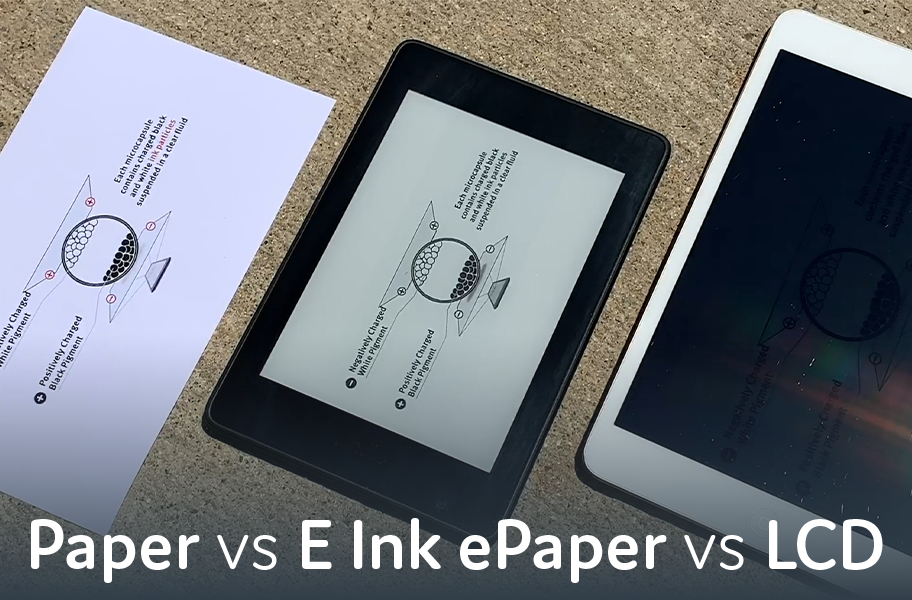
Professional work often demands compromising between screen real estate and visual comfort. Large monitors cause eye fatigue. Tablets force constant zooming on documents. Paper provides ideal viewing but lacks digital flexibility.
Devices with 13.3-inch E-Ink displays eliminate these trade-offs. These screens match A4 paper dimensions, displaying full-page PDFs and technical drawings at actual size without zooming.
The A4 advantage
Screen size matters when working with professionally formatted documents. Most PDFs, contracts, and academic papers are designed for A4 or letter-sized paper. Smaller screens require constant zooming and panning.
The Boox Note Max Open Box addresses this with its 13.3-inch display measuring 3200 x 2400 pixels at 300 PPI. This resolution matches high-quality laser printing. Engineering drawings, sheet music, and legal documents were displayed at the intended size.
Professionals report that full-page viewing dramatically improves comprehension. The eye tracks naturally across paragraphs without panning. Diagrams become immediately readable. The cognitive load of translating between zoomed sections disappears.
Carta 1300 display technology
E-Ink Carta 1300 represents the latest electronic paper generation. Compared to Carta 1200, it delivers enhanced contrast with deeper blacks and brighter whites.
The 300 PPI pixel density ensures text rendering that rivals printed pages. Small fonts in footnotes remain readable without magnification. This clarity reduces eye strain during extended document review.
Without color filters or front lighting, E-Ink microcapsules sit closer to the protective glass. This reduces parallax and creates the impression of ink sitting directly on the surface.
Processing for professional applications
The octa-core processor at 2.8 GHz provides smooth navigation through complex PDFs. Combined with 6GB RAM, it handles multitasking without lag.
Split-screen functionality allows viewing reference material alongside note-taking. Users compare two documents side-by-side, maintaining context while working.
Storage of 128GB accommodates extensive libraries. Researchers carry entire reference collections. Legal professionals access case files without connectivity. The capacity eliminates selective syncing.
Ultra-slim engineering
At 4.6mm thick, the chassis achieves tablet-like thinness. The aluminum-magnesium alloy provides rigidity without excessive weight.
Weighing 615 grams, it feels substantial yet light enough for prolonged holding. This matches many 11-inch tablets despite the larger screen. Weight distribution prevents fatigue.
Minimal bezels maximize screen area. Clean lines suit professional environments from boardrooms to classrooms. The device draws attention through capability rather than appearance.
Natural writing experience
The 13.3-inch surface accommodates full-page note-taking without cramping. Writers work in comfortable script sizes without filling pages immediately.
The Wacom EMR stylus layer supports 4,096 pressure levels. The included stylus provides tactile feedback through its replaceable fiber tip. Writing generates subtle resistance that mimics pen on quality paper.
Platforms like einktab.ca emphasize devices optimized for professional note-taking and document annotation. The focus falls on creating tools that enhance productivity through comfort.
Battery efficiency
Despite the large display and powerful processor, battery life extends for weeks. The 3,700 mAh capacity seems modest, but E-Ink’s efficiency changes calculations. Static content consumes no power.
Professionals use devices intensively for days without charging. This reliability matters for field work, travel, or uncertain power access.
Efficiency suits environments prioritizing sustainability. Reduced charging lowers energy consumption over device lifetime. Extended operation enables work patterns impossible with daily-charging devices.
Einktab workflows
Einktab users consistently report workflow improvements. Academics mark up journal articles efficiently. Lawyers review contracts with better comprehension. Engineers annotate technical drawings clearly. Musicians read sheet music without page-turn disruptions.
Technology fades into the background. Users focus on content rather than managing limitations. The screen becomes a canvas rather than a constraint.
Professional applications
Legal professionals use large E-Ink displays for contract review, maintaining readability during hours of examination. Annotating streamlines revisions directly. Highlighting and notes remain visible without obscuring text.
Academic researchers view journal articles at publication size. Two-column scholarly format displays properly. Split-screen allows referencing related papers while taking notes.
Creative professionals sketch concepts and diagram information architectures. The large canvas supports natural brainstorming. Stylus accuracy enables detailed work across the full screen.
The evolving future
Large-format E-Ink devices gain new capabilities as technology advances. Color implementations appear at this screen size. Faster refresh rates reduce interaction latency.
Integration with productivity ecosystems improves. Cloud synchronization keeps documents accessible. Handwriting recognition converts notes to searchable text. File format support expands for specialized applications.
The focus remains on providing digital tools that match or exceed paper comfort. The goal is enhancing paper—adding search, organization, and connectivity while preserving visual comfort.
Large-format E-Ink displays prove professional tools need not sacrifice comfort for capability. By matching paper dimensions, providing natural writing surfaces, and maintaining eye-friendly technology, these devices enable work patterns honoring both productivity and well-being. The quiet revolution demonstrates that the best advancement sometimes comes from technology that disappears.