
For years, the Wacom drawing tablet has held its position as the go-to choice for digital artists, animators, illustrators, and creative professionals. Known for its pressure sensitivity, pen accuracy, and robust build, Wacom has been a trusted brand in the creative industry.
But in 2025, many artists are starting to ask: Do I need to buy a Wacom drawing tablet, or are there other good drawing tablets that offer better value?
With technology evolving rapidly, several brands like XPPen, Huion, Gaomon, and Veikk have stepped up with impressive alternatives—often offering similar features at a much more affordable price.
Let’s explore the best alternatives on the market and see why you might skip Wacom in 2025.
Why Not Choose a Wacom Drawing Tablet?
Before diving into alternatives, it’s helpful to understand why some artists are moving away from Wacom:
- High cost: Wacom tablets, especially those with screens like the Cintiq series, can be significantly more expensive than competing brands with similar specs.
- Slower innovation: While Wacom has focused on stability and quality, other brands are experimenting with fresh ideas, improved pen technology, and better compatibility.
- More budget-conscious options available: Beginners and hobbyists often don’t need the high-end features (and prices) of Wacom.
The question today isn’t whether Wacom is good—it still is—but rather whether it’s the best choice for your needs and budget.
A Look at the Best Alternatives to Wacom in 2025
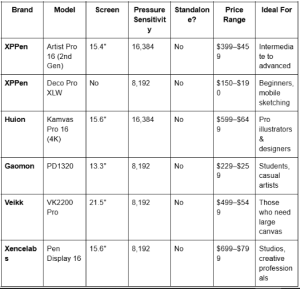
Here’s a comparison of some other good drawing tablets that provide excellent performance and usability, many of which rival Wacom’s features.
Comparison Table: Wacom Alternatives for 2025
What Makes These Tablets Strong Wacom Alternatives?
Each of these brands has focused on improving core features: stylus responsiveness, color-accurate displays, build quality, and driver reliability.
XPPen (Artist Pro 16 / Deco Pro Series)
XPPen has gained a strong reputation for delivering professional-quality tablets at mid-range prices. The Artist Pro 16 features 4K visuals and a fully laminated display, plus 16,384 pressure levels and tilt support—specs that closely rival Wacom Cintiq, but at nearly half the price.
For those who prefer screenless tablets, the Deco Pro XLW offers wireless connectivity and a large drawing surface, perfect for digital sketching and editing on the go.
Huion (Kamvas Series)
Huion has come a long way with its Kamvas Pro 16 (4K), boasting a 4K UHD laminated screen, full Adobe RGB support, and an ultra-responsive stylus. It’s ideal for illustrators, animators, and 3D modelers who need color precision and responsiveness.
Gaomon (PD Series)
Gaomon offers excellent value for beginners and students. The PD1320 is compact and highly portable, with strong pressure sensitivity and good build quality at a very affordable price point.
Veikk (VK Series)
Veikk’s VK2200 Pro features a large 21.5-inch screen with customizable shortcut keys and accurate pen tracking. It’s well-suited for users who want an expansive digital workspace without the high cost of Wacom’s 22-inch models.
Xencelabs (Pen Display 16)
Targeted at professionals, Xencelabs has built premium devices that rival Wacom in build quality and stylus experience. The Pen Display 16 is sleek, reliable, and a true competitor to the Wacom Cintiq Pro line—often preferred by studio-level creators.
What About Standalone Drawing Tablets?
If you’re looking for a drawing tablet that doesn’t require a connection to a computer, Wacom’s MobileStudio Pro has historically been a top choice. However, newer devices are now offering serious competition:
- Huion Kamvas Studio 16: A Windows-based standalone pen display that offers strong performance for digital art and multitasking.
- iPad Pro + Apple Pencil: Continues to dominate in portability and app support (e.g. Procreate, Adobe Fresco).
- Samsung Galaxy Tab S9 Ultra: A versatile Android-based option with great stylus support.
- Microsoft Surface Pro 9: Blends productivity with creative potential, especially for those who prefer the Windows environment.
These devices may not replace a dedicated drawing tablet for everyone, but they’re excellent options for artists who work remotely, travel often, or prefer an all-in-one device.
How to Choose the Right Tablet for You
If you’re not buying a Wacom drawing tablet, here are a few key factors to consider when choosing among other good drawing tablets:
- Budget: Many of the best alternatives come in under $500.
- Type of work: High-resolution displays matter more for painting and illustration, while screenless tablets work great for design and sketching.
- Portability: Do you need a compact tablet, or are you setting up a permanent studio?
- Software compatibility: Ensure the tablet works smoothly with your preferred apps—most options now support Photoshop, Clip Studio Paint, Illustrator, Blender, etc.
Conclusion
Wacom has long been the king of drawing tablets, but times have changed. If you’re on a budget, or simply want to explore alternatives with modern features, other good drawing tablets from brands like XPPen, Huion, Gaomon, Veikk, and Xencelabs now offer serious competition—at prices that make digital art more accessible than ever.
Whether you’re a seasoned artist or a beginner finding your creative path, there’s no shortage of powerful, reliable, and affordable options beyond the Wacom brand.
So, what if you didn’t buy a Wacom drawing tablet in 2025? You might discover a better fit—for your style, your workflow, and your wallet.
Read More From baddiehubx