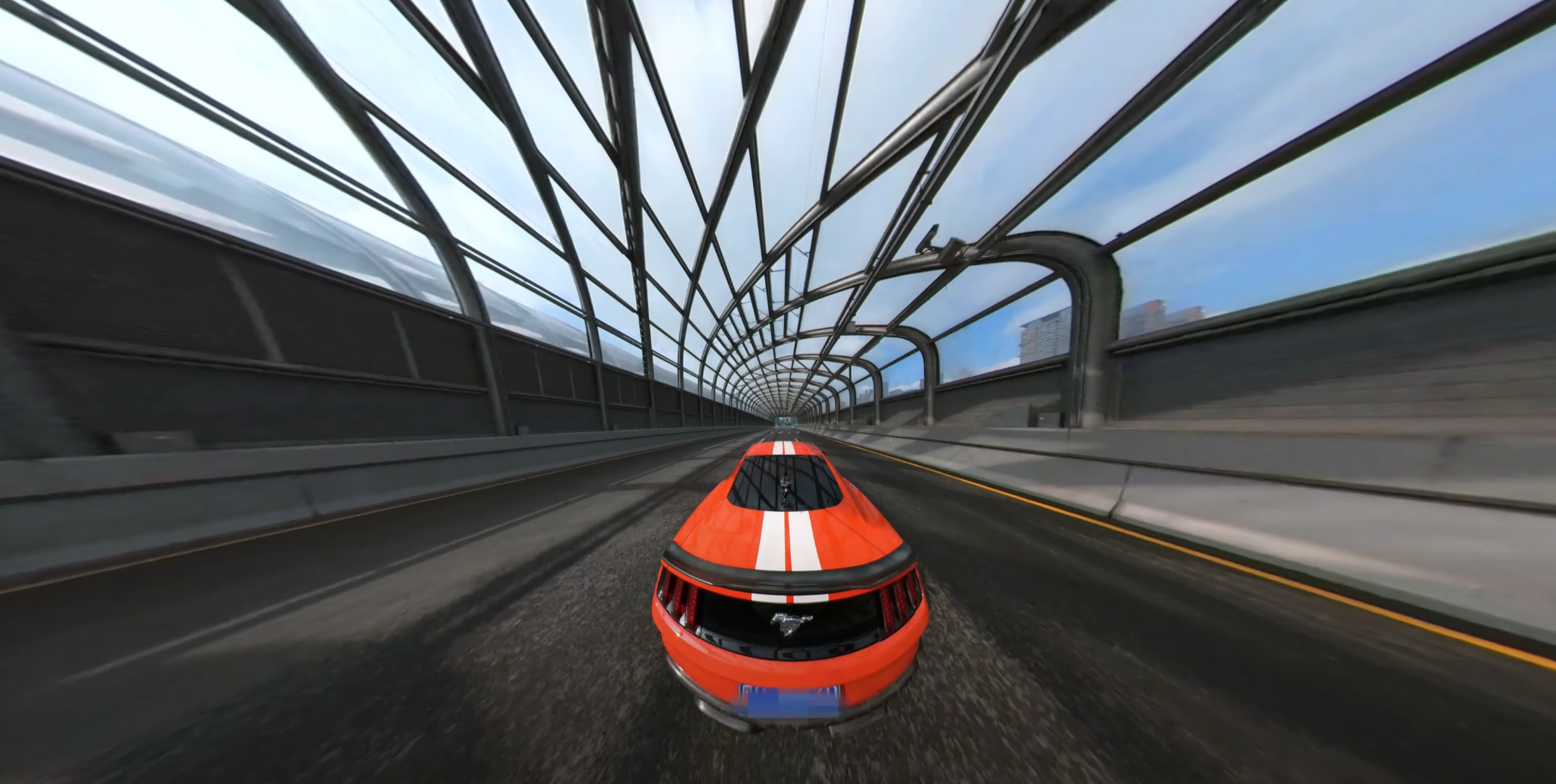
Capturing cinematic car shots has never been easier, thanks to the versatility of 360 cameras. These compact devices let you film every angle at once, giving you endless creative possibilities for dynamic driving scenes. But the real magic happens in post-production, where reframing allows you to craft smooth, immersive visuals that feel straight out of a blockbuster.
In this article, you’ll learn how to use 360 cameras to elevate your car shots and master the art of reframing in post. Whether you’re aiming for dramatic chase sequences or scenic road trip vibes, we’ll guide you through techniques to transform raw footage into stunning, professional-grade visuals.
Understanding Cinematic Car Shots With 360 Cameras
A 360 degree camera captures a vehicle’s movement from every angle in one seamless take, offering unmatched flexibility for cinematic storytelling. Thanks to spherical lenses, it records continuous footage in all directions—allowing you to reframe moments during editing without needing multiple setups.
Dynamic driving scenes benefit from the unique ability to shift viewpoints seamlessly. You can highlight a car’s exterior details, switch to a passenger’s perspective, or showcase the road disappearing below the vehicle—all from one recording. This reduces the need for multiple cameras or retakes, making the process efficient.
Consider lighting, motion, and environment when recording. A fast car chase creates a different impact than a slow, scenic drive. Use stable mounting to minimize vibrations. This ensures your raw footage remains clear for editing. A well-framed sequence results from planning your capture angles while maximizing the camera’s spherical capabilities.
Choosing The Right 360 Camera For Dynamic Driving Scenes
Capturing cinematic car shots requires a 360 camera capable of recording smooth, high-quality footage under challenging conditions. Selecting a model with features that enhance both recording and post-production maximizes the potential for dynamic driving scenes.
Features To Look For In A 360 Camera
- Stabilization: Reduces shake from vibrations or rough surfaces.
- High Resolution: Delivers detailed visuals for cinematic quality.
- Frame Rate: Supports fluid motion in fast-paced scenes.
- Durability: Handles environmental factors like dust or rain.
- Mounting Flexibility: Adapts to various positions like roofs or dashboards.
- Software Compatibility: Facilitates precise reframing and edits in post.
Recommended 360 Cameras For Cinematic Shots
Look for models offering advanced stabilization systems to maintain clarity during motion. Cameras with resolutions like 5.7K or higher ensure every detail stands out. Higher frame rates, such as 60fps or beyond, capture smooth movements essential for dynamic driving.
Durable designs protect against water, impacts, or extreme temperatures, making outdoor shoots more reliable. Magnet or suction mount options provide secure and creative placement around the vehicle. Check for integration with editing tools that simplify reframing workflows after shooting.
Capturing Dynamic Driving Scenes
360 cameras are revolutionizing travel filming by capturing every angle in a single take. This full-sphere perspective offers unmatched flexibility in editing, allowing you to craft precise shots from a single recording session.
Setting Up Your 360 Camera for Car Shots
Choose mounts like suction cups or magnetic bases for secure attachment to the car. Dashboard mounts provide forward-facing views, while roof or rear mounts capture surroundings and motion.
Use built-in stabilization or a stable rig to reduce vibrations. Adjust camera settings to 4K or higher with at least 30fps for smooth visuals. Match exposure and white balance to lighting conditions.
Essential Tips for Shooting on the Road
Midday or golden hours offer optimal light. Tweak camera settings during low-light shoots to decrease grainy footage.
Double-check every mount’s grip to avoid dislodging during motion. Plan careful placement for shots like drive-over scenes. Enhance the final output by editing with video tools to reframe, color grade, or stabilize captured footage.
Reframing Shots In Post-Production
Using an Insta360 camera gives you full creative control during editing by allowing you to reframe shots long after filming. This flexibility eliminates the need for multiple takes, saving both time and production resources—making it ideal for capturing spontaneous or fast-moving moments.
Selecting The Best Angles To Tell Your Story
Capture unique perspectives by choosing dynamic framing techniques. Consider a dramatic “top-down” shot for a bird’s-eye perspective or a “drive-over” shot to convey motion intensity.
Experiment with angles captured from the dashboard or rear window to highlight key details. Use stable mounting positions to limit distractions like vibrations in the final footage.
Tools And Software For Reframing 360 Videos
Editing tools are essential for adjusting perspectives and stabilizing scenes. Pick software capable of stitching footage seamlessly and refining perspectives. Look for options with advanced controls for fine-tuning angles, speeding up workflows, and applying effects. Easily learnable platforms reduce delays in editing, letting you bring your ideas to life faster.
Enhancing Footage With Color Grading And Effects
Use color grading to match the tone of your story, emphasizing natural light during golden hours. Modify brightness, contrast, and saturation for clarity in low-light or overexposed settings.
Combine this with effects like subtle camera shakes or precise audio layering, such as engine sounds, to enhance the drama of your driving scenes.
Creative Techniques For Unique Driving Scenes
360 cameras let you capture a range of perspectives with a single setup. Post-production reframing expands your creative possibilities, offering dynamic and immersive visuals.
Incorporating Motion And Transitions
Choose stable mounting points, like the car’s roof or hood, to record smooth shots. Use in-camera stabilization to minimize vibrations caused by the vehicle’s movement.
Reframe footage in editing to create fluid pans or tilts, transitioning between different views within the spherical video. Combine these movements with cuts or zooms to emulate tools like cranes or dollies and enhance your scene’s cinematic feel.
Using Slow Motion And Time Lapse Effectively
Modify playback speeds to emphasize mood or motion. For instance, slowing footage to 50% can highlight a car navigating curves, while speeding it up by 140% can create engaging rapid sequences.
Try slow motion for impactful visuals, such as driving through scenic terrain. Use time lapse to condense long journeys, pacing shifts effectively. Match these with sound effects to heighten immersion.
Conclusion
Mastering cinematic car shots with 360 cameras opens up endless creative possibilities for dynamic driving scenes. By leveraging their unique capabilities and refining your footage in post-production, you can craft visually stunning and immersive visuals that captivate your audience.
With the right camera setup, thoughtful planning, and creative editing techniques, you’ll transform ordinary road footage into professional-grade storytelling. Embrace experimentation and let your creativity drive the narrative of your next project.